When creating a single player game or a private lobby, game settings can be changed. This includes the selected map, bot difficulty, switching between FFA and Teams mode and additional game options.
Bot Difficulty
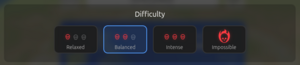
There are 4 difficulties to select from:
- Relaxed
- Balanced
- Intense
- Impossible
For more information on the difficulties, see difficulty.
Game Mode

There are 2 game modes to choose from:
- Free for All (FFA)
- Teams
Teams mode is split into several sub-modes:
- 2-7 teams
- Duos (Teams of 2)
- Trios (Teams of 3)
- Squads (Teams of 4)
- Humans Vs Nations
Additional Options
Different buildings/units can be toggled:
The bot count can be set in a range from 0 to 400 and nations can be toggled.
Other options can be toggled:
- Instant Build
- Random Spawn
- Infinite Gold
- Infinite Troops
- Compact Map
- Anonymous Names (replaces player names with memorable animal names, as of Update 33.0)
The game length can be set in minutes from this menu. A custom alliance duration can also be configured (as of Update 33.0).
Since Update 36.0, custom games also have a Win threshold (%) setting next to Game length and Overtime. It is off by default, which keeps the usual 80% of the land. Host-lobby and single player settings can be saved as named presets and loaded again from a button in the header.